Building High-Performance Blogs with Next.js 15: Complete SSG and ISR Implementation Guide
Static Site Generation (SSG) and Incremental Static Regeneration (ISR) are game-changers for building lightning-fast, SEO-optimized blogs. In this guide, I'll walk you through implementing these features in a production-ready Next.js 15 blog, complete with real code examples and best practices.

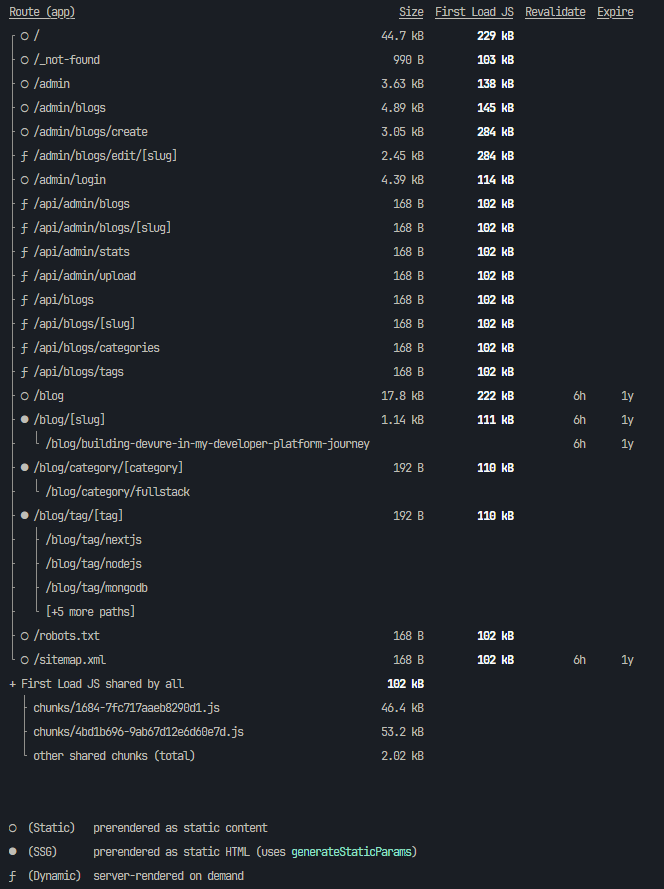
Understanding SSG vs ISR vs SSR
Before diving into implementation, let's clarify when to use each approach:
Static Site Generation (SSG)
Best for: Content that rarely changes (marketing pages, documentation)
Benefits: Fastest possible loading, excellent SEO, CDN-friendly
Trade-off: Content can become stale
Incremental Static Regeneration (ISR)
Best for: Content that changes periodically (blogs, e-commerce, news)
Benefits: Combines SSG speed with content freshness
Trade-off: Slight complexity in cache management
Server-Side Rendering (SSR)
Best for: Highly dynamic, user-specific content (dashboards, social feeds)
Benefits: Always fresh data
Trade-off: Slower initial load, higher server load
Implementing getStaticProps: The Foundation
getStaticProps is your gateway to SSG. Here's how to implement it effectively:
Basic Implementation
typescript
// pages/products/index.tsx
import { GetStaticProps } from 'next';

interface Product {
  id: string;
  title: string;
  price: number;
  description: string;
}

interface ProductsPageProps {
  products: Product[];
  lastUpdated: string;
}

export default function ProductsPage({ products, lastUpdated }: ProductsPageProps) {
  return (
    <div>
      <h1>Our Products</h1>
      <p>Last updated: {lastUpdated}</p>
      <div className="grid gap-4">
        {products.map(product => (
          <div key={product.id} className="border p-4 rounded">
            <h2>{product.title}</h2>
            <p>${product.price}</p>
            <p>{product.description}</p>
          </div>
        ))}
      </div>
    </div>
  );
}

export const getStaticProps: GetStaticProps<ProductsPageProps> = async () => {
  // This runs at build time
  const response = await fetch('https://api.example.com/products');
  const products = await response.json();

  return {
    props: {
      products,
      lastUpdated: new Date().toISOString(),
    },
    // No revalidate = pure SSG
  };
};
Advanced Data Fetching Patterns
typescript
// Concurrent data fetching for better performance
export const getStaticProps: GetStaticProps = async () => {
  try {
    // Fetch multiple data sources simultaneously
    const [products, categories, featuredItems] = await Promise.all([
      fetch('https://api.example.com/products').then(res => res.json()),
      fetch('https://api.example.com/categories').then(res => res.json()),
      fetch('https://api.example.com/featured').then(res => res.json()),
    ]);

    return {
      props: {
        products,
        categories,
        featuredItems,
        buildTime: Date.now(),
      },
    };
  } catch (error) {
    console.error('Build-time data fetch failed:', error);

    // Return fallback data instead of failing the build
    return {
      props: {
        products: [],
        categories: [],
        featuredItems: [],
        buildTime: Date.now(),
        error: 'Failed to load data',
      },
    };
  }
};
Implementing ISR: The Game Changer
ISR allows your static pages to stay fresh automatically. Here's how to implement it:
Basic ISR Setup
typescript
// pages/blog/index.tsx
export const getStaticProps: GetStaticProps = async () => {
  const posts = await fetchBlogPosts();

  return {
    props: { posts },
    // Revalidate every hour (3600 seconds)
    revalidate: 3600,
  };
};
Strategic Revalidation Periods
Choose your revalidation time based on content update frequency:
typescript
// Different strategies for different content types
export const getStaticProps: GetStaticProps = async ({ params }) => {
  const contentType = params?.type as string;

  let revalidateTime: number;

  switch (contentType) {
    case 'news':
      revalidateTime = 300; // 5 minutes - breaking news
      break;
    case 'blog':
      revalidateTime = 3600; // 1 hour - regular blog posts
      break;
    case 'documentation':
      revalidateTime = 86400; // 24 hours - stable content
      break;
    case 'products':
      revalidateTime = 1800; // 30 minutes - pricing updates
      break;
    default:
      revalidateTime = 3600;
  }

  const data = await fetchContentByType(contentType);

  return {
    props: { data, contentType },
    revalidate: revalidateTime,
  };
};
Dynamic Routes with ISR
Implement ISR for dynamic routes using getStaticPaths:
typescript
// pages/products/[slug].tsx
export const getStaticPaths: GetStaticPaths = async () => {
  // Pre-generate popular products at build time
  const popularProducts = await fetchPopularProducts();

  const paths = popularProducts.map((product) => ({
    params: { slug: product.slug },
  }));

  return {
    paths,
    // Enable ISR for other products
    fallback: 'blocking', // or true for non-blocking
  };
};

export const getStaticProps: GetStaticProps = async ({ params }) => {
  const product = await fetchProductBySlug(params?.slug as string);

  if (!product) {
    return { notFound: true };
  }

  return {
    props: { product },
    revalidate: 1800, // 30 minutes for product updates
  };
};
Handling Fallback Strategies
Understanding fallback modes is crucial for ISR:
Blocking Fallback
typescript
return {
  paths,
  fallback: 'blocking', // User waits for page generation
};
Use when: SEO is critical, user experience can tolerate loading
Benefits: Perfect SEO, no layout shift
Trade-offs: Slower first visit for new pages
Non-blocking Fallback
typescript
return {
  paths,
  fallback: true, // Show loading state immediately
};

// In your component
function ProductPage({ product }) {
  const router = useRouter();

  if (router.isFallback) {
    return <div>Loading amazing product details...</div>;
  }

  return <div>{/* Your product content */}</div>;
}
Use when: User experience is priority over SEO
Benefits: Instant loading state
Trade-offs: Requires loading state handling
Advanced ISR Patterns
Conditional Revalidation
typescript
export const getStaticProps: GetStaticProps = async ({ params, preview }) => {
  const content = await fetchContent(params?.id as string);

  // Don't cache preview content
  if (preview) {
    return { props: { content } };
  }

  // Adjust revalidation based on content freshness needs
  const isNewsContent = content.category === 'news';
  const isUrgent = content.tags?.includes('breaking');

  let revalidateTime = 3600; // Default: 1 hour

  if (isNewsContent && isUrgent) {
    revalidateTime = 60; // 1 minute for breaking news
  } else if (isNewsContent) {
    revalidateTime = 300; // 5 minutes for regular news
  }

  return {
    props: { content },
    revalidate: revalidateTime,
  };
};
Error Handling in ISR
typescript
export const getStaticProps: GetStaticProps = async ({ params }) => {
  try {
    const data = await fetchData(params?.id as string);

    return {
      props: { data, error: null },
      revalidate: 3600,
    };
  } catch (error) {
    console.error('ISR fetch error:', error);

    // Return cached data with error flag
    // This prevents the page from breaking
    return {
      props: {
        data: null,
        error: 'Failed to load fresh content',
        lastSuccessfulUpdate: new Date().toISOString(),
      },
      revalidate: 60, // Retry more frequently when there's an error
    };
  }
};
On-Demand Revalidation (Next.js 12.2+)
Trigger revalidation programmatically when content changes:
API Route for Webhook
typescript
// pages/api/revalidate.ts
import { NextApiRequest, NextApiResponse } from 'next';

export default async function handler(req: NextApiRequest, res: NextApiResponse) {
  // Verify the request is from your CMS
  if (req.query.secret !== process.env.REVALIDATE_TOKEN) {
    return res.status(401).json({ message: 'Invalid token' });
  }

  try {
    const { slug, type } = req.body;

    // Revalidate specific pages
    if (type === 'post' && slug) {
      await res.revalidate(`/blog/${slug}`);
      await res.revalidate('/blog'); // Also update listing page
    }

    if (type === 'product' && slug) {
      await res.revalidate(`/products/${slug}`);
      await res.revalidate('/products');
    }

    // Revalidate homepage if it shows latest content
    await res.revalidate('/');

    return res.json({ revalidated: true, timestamp: new Date().toISOString() });
  } catch (err) {
    console.error('Revalidation error:', err);
    return res.status(500).send('Error revalidating');
  }
}
Client-Side Revalidation Trigger
typescript
// Admin panel or CMS integration
async function triggerRevalidation(contentType: string, slug: string) {
  try {
    const response = await fetch('/api/revalidate', {
      method: 'POST',
      headers: { 'Content-Type': 'application/json' },
      body: JSON.stringify({
        type: contentType,
        slug,
        secret: process.env.NEXT_PUBLIC_REVALIDATE_TOKEN
      }),
    });

    if (response.ok) {
      console.log('Revalidation triggered successfully');
    }
  } catch (error) {
    console.error('Failed to trigger revalidation:', error);
  }
}
SEO and Metadata Best Practices
Dynamic Metadata Generation
typescript
// app/blog/[slug]/page.tsx (App Router)
import { Metadata } from 'next';

export async function generateMetadata({ params }): Promise<Metadata> {
  const post = await fetchPost(params.slug);

  if (!post) {
    return { title: 'Post Not Found' };
  }

  return {
    title: `${post.title} | Your Site Name`,
    description: post.excerpt,
    keywords: post.tags?.join(', '),
    openGraph: {
      title: post.title,
      description: post.excerpt,
      images: [{ url: post.featuredImage }],
      type: 'article',
      publishedTime: post.publishedAt,
    },
    twitter: {
      card: 'summary_large_image',
      title: post.title,
      description: post.excerpt,
      images: [post.featuredImage],
    },
  };
}
Structured Data Implementation
typescript
// components/StructuredData.tsx
interface ArticleStructuredDataProps {
  title: string;
  description: string;
  publishedAt: string;
  author: string;
  image?: string;
}

export function ArticleStructuredData({
  title,
  description,
  publishedAt,
  author,
  image
}: ArticleStructuredDataProps) {
  const structuredData = {
    '@context': 'https://schema.org',
    '@type': 'Article',
    headline: title,
    description,
    datePublished: publishedAt,
    author: {
      '@type': 'Person',
      name: author,
    },
    ...(image && {
      image: {
        '@type': 'ImageObject',
        url: image,
      },
    }),
  };

  return (
    <script
      type="application/ld+json"
      dangerouslySetInnerHTML={{ __html: JSON.stringify(structuredData) }}
    />
  );
}
Performance Optimization Techniques
Optimized Data Fetching
typescript
// lib/optimizedFetching.ts
interface CacheConfig {
  ttl: number; // Time to live in seconds
  key: string;
}

const cache = new Map();

export async function cachedFetch<T>(
  url: string,
  config: CacheConfig
): Promise<T> {
  const now = Date.now();
  const cached = cache.get(config.key);

  // Return cached data if still valid
  if (cached && (now - cached.timestamp) < (config.ttl * 1000)) {
    return cached.data;
  }

  // Fetch fresh data
  const response = await fetch(url);
  const data = await response.json();

  // Cache the result
  cache.set(config.key, {
    data,
    timestamp: now,
  });

  return data;
}

// Usage in getStaticProps
export const getStaticProps: GetStaticProps = async () => {
  const products = await cachedFetch('/api/products', {
    key: 'products-list',
    ttl: 300, // 5 minutes
  });

  return {
    props: { products },
    revalidate: 600, // 10 minutes
  };
};
Image Optimization with ISR
typescript
// components/OptimizedImage.tsx
import Image from 'next/image';

interface OptimizedImageProps {
  src: string;
  alt: string;
  width: number;
  height: number;
  priority?: boolean;
}

export function OptimizedImage({
  src,
  alt,
  width,
  height,
  priority = false
}: OptimizedImageProps) {
  return (
    <Image
      src={src}
      alt={alt}
      width={width}
      height={height}
      priority={priority}
      sizes="(max-width: 768px) 100vw, (max-width: 1200px) 50vw, 33vw"
      style={{ objectFit: 'cover' }}
      placeholder="blur"
      blurDataURL="data:image/jpeg;base64,/9j/4AAQSkZJRgABAQAAAQ..."
    />
  );
}
Monitoring and Analytics
Performance Tracking
typescript
// lib/analytics.ts
export function trackPageGeneration(pagePath: string, generationType: 'build' | 'isr') {
  if (typeof window !== 'undefined' && window.gtag) {
    window.gtag('event', 'page_generation', {
      event_category: 'Performance',
      event_label: pagePath,
      custom_parameter_1: generationType,
    });
  }
}

// Usage in pages
export const getStaticProps: GetStaticProps = async ({ params }) => {
  const startTime = Date.now();

  try {
    const data = await fetchData(params?.id as string);

    // Track successful generation
    const duration = Date.now() - startTime;
    console.log(`ISR generation took ${duration}ms for ${params?.id}`);

    return {
      props: {
        data,
        generatedAt: new Date().toISOString(),
        generationTime: duration,
      },
      revalidate: 3600,
    };
  } catch (error) {
    console.error('ISR generation failed:', error);
    throw error;
  }
};
Production Deployment Checklist
Environment Configuration
bash
# Essential environment variables
SITE_URL=https://yourdomain.com
NODE_ENV=production

# ISR-specific
REVALIDATE_TOKEN=your-secret-token

# Database/API
API_BASE_URL=https://api.yourdomain.com
DATABASE_URL=your-database-url

# Performance monitoring
SENTRY_DSN=your-sentry-dsn
GOOGLE_ANALYTICS_ID=your-ga-id
Next.js Configuration
javascript
// next.config.js
/** @type {import('next').NextConfig} */
const nextConfig = {
  // Enable React 18 features
  reactStrictMode: true,

  // Optimize for performance
  swcMinify: true,

  // Configure ISR
  generateBuildId: async () => {
    return process.env.NODE_ENV === 'production'
      ? require('crypto').randomBytes(16).toString('hex')
      : 'development';
  },

  // Optimize images
  images: {
    domains: ['yourdomain.com', 'cdn.yourdomain.com'],
    formats: ['image/avif', 'image/webp'],
  },

  // Headers for better caching
  async headers() {
    return [
      {
        source: '/:path*',
        headers: [
          {
            key: 'X-Frame-Options',
            value: 'DENY',
          },
          {
            key: 'X-Content-Type-Options',
            value: 'nosniff',
          },
        ],
      },
    ];
  },
};

module.exports = nextConfig;
Common Pitfalls and Solutions
Pitfall 1: Over-revalidating
Problem: Setting revalidate time too low causes unnecessary builds Solution: Profile your content update frequency and set appropriate intervals
Pitfall 2: Ignoring Error States
Problem: ISR failures break user experience Solution: Always implement fallback data and error boundaries
Pitfall 3: Not Planning for Scale
Problem: Too many ISR pages overwhelm your server Solution: Use on-demand revalidation and strategic pre-generation
Pitfall 4: Forgetting Cache Headers
Problem: CDN and browser caching conflicts with ISR Solution: Configure proper cache headers for your deployment platform
Real-World Use Cases
E-commerce Product Pages
Strategy: ISR with 30-minute revalidation
Benefits: Fresh pricing, fast loading
Implementation: Pre-generate popular products, ISR for long tail
News Websites
Strategy: Mixed SSG/ISR based on content age
Benefits: Breaking news updates, archived content performance
Implementation: Recent articles use ISR, older articles use SSG
Documentation Sites
Strategy: On-demand revalidation via webhooks
Benefits: Always accurate, excellent performance
Implementation: Trigger revalidation when docs are updated
Corporate Blogs
Strategy: ISR with 6-hour revalidation
Benefits: SEO optimization, content freshness
Implementation: Pre-generate recent posts, ISR for archives
Conclusion
SSG and ISR are powerful tools that can transform your application's performance and user experience. The key is understanding when and how to use each approach:
Use SSG for content that rarely changes
Use ISR for content that needs to stay fresh
Use on-demand revalidation for immediate updates
Monitor performance to optimize revalidation strategies
Start with basic SSG implementation, then gradually introduce ISR where it adds value. Remember that the best strategy depends on your specific use case, content update frequency, and user expectations.
By following these patterns and best practices, you'll be able to build applications that are both lightning-fast and always up-to-date, providing the best possible experience for your users while maintaining excellent SEO performance.